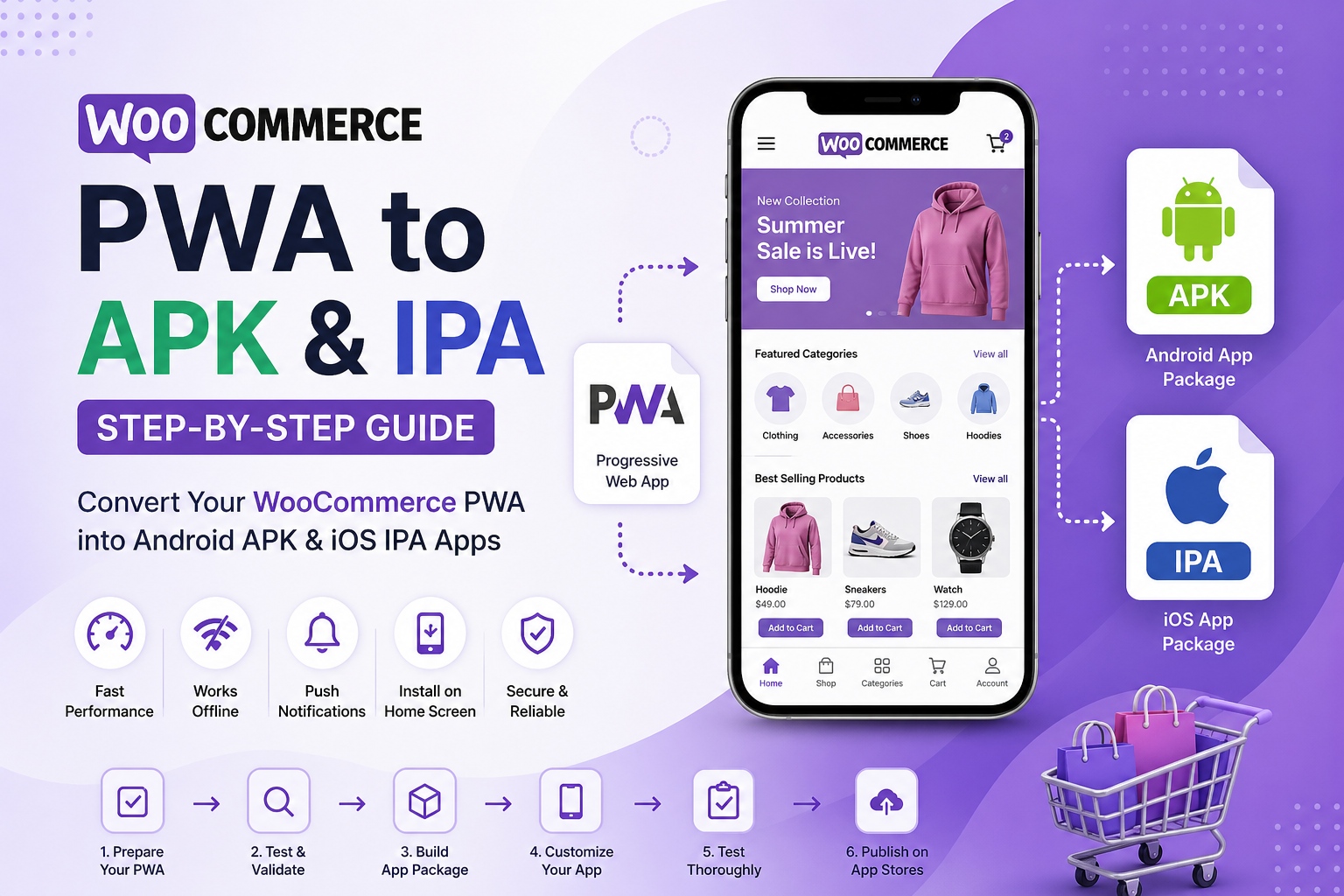
In today’s mobile-first world, eCommerce businesses are constantly looking for ways to deliver seamless app-like experiences without investing heavily in native app development. One powerful solution is converting your WooCommerce store into a Progressive Web App (PWA) and then packaging it into APK (Android) and IPA (iOS) files.
This comprehensive guide will walk you through everything you need to know—from understanding PWAs to converting them into app store-ready files.
What is WooCommerce PWA?
A Progressive Web App (PWA) is a web-based application that behaves like a native mobile app. It combines the best of websites and mobile apps, offering fast performance, offline access, and push notifications.
When applied to WooCommerce, a PWA allows users to:
- Browse products quickly
- Install the store on their home screen
- Receive push notifications
- Shop even with slow or no internet
Unlike traditional apps, PWAs don’t require installation from app stores—but converting them into APK and IPA allows you to reach a wider audience.
Why Convert WooCommerce PWA to APK & IPA?
Converting your WooCommerce PWA into mobile app packages has several benefits:
App Store Presence
Publishing your app on Google Play and Apple App Store increases visibility and credibility.
Better User Engagement
Mobile apps typically have higher retention rates than websites.
Push Notifications
You can directly engage users with offers and updates.
Offline Functionality
PWAs support offline browsing, improving user experience.
Increased Sales
Faster loading and smoother UX lead to higher conversions.
Prerequisites Before Conversion
Before you start converting your WooCommerce PWA into APK and IPA, ensure the following:
- Your WooCommerce store is live and functional
- HTTPS is enabled
- PWA is properly configured (manifest.json + service worker)
- Mobile responsiveness is optimized
- Icons and splash screens are ready
If you need expert assistance, consider working with a woocommerce web development agency for a smooth setup.
Step 1: Convert WooCommerce Website into PWA
First, you need to transform your WooCommerce store into a PWA.
Methods:
- Use PWA plugins (e.g., PWA for WP, SuperPWA)
- Use custom development
- Use PWA builders
Key Components:
- Manifest file – defines app name, icon, theme
- Service Worker – enables offline functionality
- HTTPS – required for security
Once installed, users will see an “Add to Home Screen” option.
Step 2: Test Your PWA
Before converting to APK/IPA, test your PWA thoroughly:
- Use Chrome DevTools (Lighthouse audit)
- Check offline functionality
- Validate responsiveness
- Test loading speed
Fix all issues before proceeding.
Step 3: Choose a Conversion Method
There are multiple ways to convert your WooCommerce PWA into APK and IPA files.
PWABuilder (Recommended)
- Converts PWA into APK & IPA
- No coding required
- Generates ready-to-publish files
Bubblewrap (Android Only)
- Creates Trusted Web Activity (TWA)
- Lightweight and Google-approved
Cordova / Capacitor
- Wraps PWA into native shell
- Supports plugins and customization
Tools like PWABuilder analyze your PWA and generate app packages automatically.
Step 4: Generate APK (Android App)
Method: Using PWABuilder or Plugin
- Enter your PWA URL
- Validate PWA requirements
- Configure app details:
- App name
- Package name
- Icon
- Download APK file
Alternatively, plugins allow one-click APK generation directly from WordPress.
Important Notes:
- Package name must be unique
- Versioning is required for updates
- Keep keystore file safe
Step 5: Generate IPA (iOS App)
iOS conversion is slightly more complex.
Steps:
- Use PWABuilder or Cordova
- Generate iOS project
- Open in Xcode (Mac required)
- Configure:
- Bundle identifier
- App icon
- Signing certificate
- Build IPA file
Unlike Android, iOS requires stricter approval and configuration.
Step 6: Publish on Google Play Store
Requirements:
- Google Play Developer Account
- APK or AAB file
- App listing details
- Screenshots and description
Steps:
- Upload APK
- Fill store details
- Submit for review
Google reviews apps for compliance before publishing.
Step 7: Publish on Apple App Store
Requirements:
- Apple Developer Account
- Xcode setup
- IPA file
Steps:
- Upload via Xcode or Transporter
- Add metadata
- Submit for review
Apple has stricter guidelines, so ensure your app meets all policies.
Step 8: Test & Optimize Your App
After publishing:
- Monitor performance
- Fix bugs
- Release updates
- Improve UI/UX
Regular updates improve rankings and user satisfaction.
Common Challenges & Solutions
App Store Rejections
Solution: Follow platform guidelines strictly
Push Notifications Not Working
Solution: Configure service worker properly
Slow Performance
Solution: Optimize images and caching
iOS Limitations
Solution: Use native wrappers like WKWebView
Best Practices for WooCommerce PWA Apps
- Use fast hosting
- Optimize images
- Enable caching
- Use CDN
- Implement lazy loading
- Provide smooth checkout experience
Why Hire Experts for WooCommerce PWA Conversion?
While DIY tools exist, professional developers ensure:
- Proper app performance
- Seamless user experience
- App store approval
- Custom features
You can hire professional wordpress developers to handle complex integrations and deliver a production-ready mobile app.
Future of WooCommerce PWAs
PWAs are becoming increasingly popular due to:
- Lower development cost
- Cross-platform compatibility
- Faster deployment
- Better performance
Businesses are shifting toward PWAs instead of native apps for scalability and cost efficiency.
Conclusion
Converting your WooCommerce PWA into APK and IPA is a powerful way to expand your eCommerce reach and improve user engagement. By following this step-by-step guide, you can transform your website into a fully functional mobile app and publish it on major app stores.
From creating a PWA to generating app packages and publishing them, each step plays a crucial role in ensuring success. Whether you choose DIY tools or expert services, investing in PWA-to-app conversion can significantly boost your online business growth.
If you want a seamless and professional solution, partnering with an experienced development team can save time and deliver better results.
FAQs
Can I convert my WooCommerce PWA into an Android app (APK)?
Yes, you can convert your WooCommerce PWA into an APK file using tools like PWABuilder, Bubblewrap, or Capacitor. This allows you to publish your app on the Google Play Store.
Is it possible to convert a WooCommerce PWA into an iOS app (IPA)?
Yes, but the process is slightly more complex than Android. You’ll typically use tools like PWABuilder or Capacitor and then finalize the app using Xcode to generate the IPA file for the Apple App Store.
Do I need coding skills to convert a PWA into APK or IPA?
Not necessarily. Many tools offer no-code or low-code solutions. However, for advanced customization, working with a woocommerce web development agency or choosing to hire professional wordpress developers is recommended.
How long does it take to convert a WooCommerce PWA into an app?
The timeline depends on your approach:
- Using plugins/tools: 1–3 days
- Custom development: 1–2 weeks
What are the benefits of converting a WooCommerce PWA into APK and IPA?
- Presence on app stores
- Increased visibility and downloads
- Better user engagement through push notifications
- Improved brand credibility
Will my app work offline after conversion?
Yes, if your PWA is properly configured with service workers, users can access certain features even without an internet connection.
Is HTTPS required for WooCommerce PWA?
Yes, HTTPS is mandatory because service workers (which power PWAs) only work on secure websites.
Can I send push notifications through my WooCommerce PWA app?
Yes, push notifications are supported, especially on Android. iOS support has improved but still comes with some limitations depending on the implementation.
Do I need separate apps for Android and iOS?
No. A single PWA can be converted into both APK and IPA formats, saving time and development costs.
What tools are best for converting WooCommerce PWA into apps?
Popular tools include:
- PWABuilder
- Capacitor
- Cordova
- Bubblewrap
How much does it cost to convert a WooCommerce PWA into an app?
Costs vary:
- Plugin-based solutions: Low cost
- Custom development: Higher cost
- Agencies: Premium pricing depending on complexity
Will converting to APK/IPA affect my website performance?
No, your website will remain unchanged. The app is essentially a packaged version of your PWA.
Can I update my app after publishing?
Yes, you can push updates by:
- Updating your PWA (auto-reflected in app)
- Uploading new versions to app stores if needed
Is WooCommerce PWA better than a native app?
It depends on your needs. PWAs are more cost-effective and faster to deploy, while native apps offer deeper device integration. For most eCommerce businesses, PWAs provide an excellent balance of performance and cost.
Do I need approval from Google and Apple to publish my app?
Yes, both platforms require app review and approval before publishing on their respective stores.
Can I integrate payment gateways in my PWA app?
Yes, WooCommerce supports multiple payment gateways, and they will work seamlessly within your PWA and app versions.
What are the limitations of WooCommerce PWAs?
- Limited access to some native device features
- iOS restrictions on push notifications (in certain cases)
- App store guidelines can be strict
Is it SEO-friendly to use a PWA?
Yes, PWAs are SEO-friendly because they are still web-based and can be indexed by search engines while offering better performance and user experience.
When should I convert my WooCommerce store into a PWA app?
You should consider it when:
- Most of your users are on mobile
- You want better engagement and retention
- You plan to expand your brand via app stores